
Buy RuralView Bullet Camera
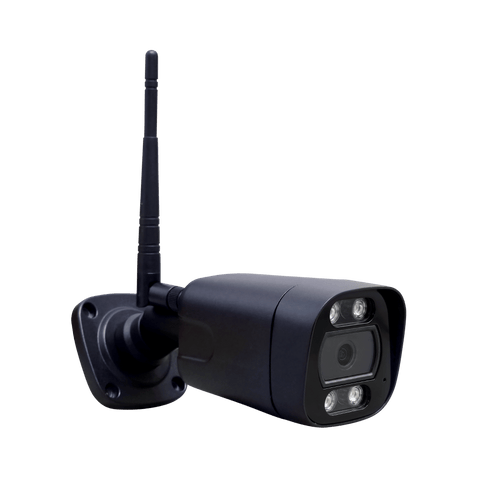
RuralView Bullet Camera
Bullet Camera Outdoor
Buy RuralView Bullet Camera
RuralView Bullet Camera
Bullet Camera Outdoor

Not sure which camera?
Our UK team can help you choose.

RuralView Bullet Camera

Trusted by 6000+ Across the UK

Trusted by 6000+ 

From £99.00

VAT included. Free shipping on orders over £200.

A fixed 90° view for farm entrances, yards and rural properties, with 5MP detail and alerts for people and vehicles.

4G model available

AI Human Detection

AI Vehicle Detection

Clear night vision (30m)

Free-to-use app

Weatherproof

4G model available

AI Human Detection

AI Vehicle Detection

Clear Night Vision (30m)

Free-to-use app

Weatherproof

Power: Mains or External 12V Battery  

Choose your setup

Total: 

£99.00

VAT included. Free shipping on orders over £200.

Quantity

Get £15 off your first order →

In stock, ready to ship

UK Delivery

18-Month Warranty

30-Day Returns

Multi-Network SIM with 4G models

For 4G use: a paid data plan and suitable signal.

For 4G use: a paid data plan and suitable signal.

Not sure which camera?
Our UK team can help you choose.

The RuralView Lifetime Promise

Support that stays with you.

When your warranty ends, our support doesn’t.

18-Month Warranty

Standard protection from day one.

Lifetime UK Support

Technical help while you own your camera.

Repair First Approach

Repair explored where practical.

Fair Replacement Options

Refurbished options or preferential pricing, where available.

View the Promise

Made for rural life

Built for farms and rural properties.

Keep an eye on entrances, yards and the places that matter.

Farm Security.

Livestock Monitoring.

Equine & Stables.

Construction Sites.

Yard & Gates.

Rural Properties.

Find the right camera.
Compare features and choose the right fit for your setup.

Awareness, wherever you are

A fixed view. Smarter alerts.

Explore human and vehicle detection, without losing sight of your chosen area.

Human detection in actionBullet

Focus on people at your property.

The fixed 90° view stays on your chosen area. Human and vehicle detection can send alerts to your phone app.

Detect Notify Review

Original demonstration footage. Detection depends on positioning, lighting and settings.

Vehicle detection in actionBullet

Know when a vehicle arrives.

The fixed 90° view stays on your chosen area. Human and vehicle detection can send alerts to your phone app.

Detect Notify Review

Original demonstration footage. Detection depends on positioning, lighting and settings.

Day or night

A clearer picture after dark.

Compare infrared and colour night vision using the original camera examples.

Infrared camera example Colour camera example ColourInfrared

Drag the divider to compare infrared and colour.

Original camera examples. Colour night vision uses the camera’s visible lights.

Recording, made simple

Your footage. On your terms.

Choose your storage and see how recording and playback work in the phone app.

Inside CamHipro

Your recordings, right in the app.

Recording at a glance

Make recording work for you.

Choose your storage and see how recording works in CamHipro.

A little history. Or a lot.

Select a card to explore its recording capacity.

Continuous recording history5 days
TodayUp to 20 days

Approximate storage time. Capacity varies with resolution, settings and activity. This example does not change your order. Loop recording overwrites the oldest footage when the card is full.

Your connection, explained

Two versions. Your choice.

Choose WiFi/PoE for broadband, or 4G where a suitable mobile signal is available.

Bullet camera at a rural home, illustrating WiFi use
WiFiCloser to home.Explore your connection
Two ways to stay connected

Choose your version.

Make the most of your WiFi.

The WiFi/PoE version uses your broadband connection, through WiFi or a compatible wired Ethernet setup.

You need
WiFi signal at the camera
Data
Your existing broadband plan

WiFi/PoE and 4G are separate versions. Both need continuous power.

Simple from the start

Easy installation.

Follow our Bullet Camera setup guides, or ask our UK team for help getting started.

Your first view starts here
1. The app

Start with CamHipro.

Install the free CamHipro app on your phone or tablet. This is where you’ll view and control your camera.

Good to know

The app is free to use. A paid data plan is needed when connecting your camera over 4G.

2. Power

Give it a steady supply.

Use mains power, a suitable external 12V battery, or a compatible solar and battery kit.

Plan your power

The Bullet has no internal battery. It needs a continuous power supply while in use.

3. Connection

Connect your chosen version.

WiFi/PoE models use your broadband connection. The separate 4G model needs an active SIM, paid data plan and suitable signal.

Before you mount it

Check signal and power at your chosen camera position. For PoE, follow the model’s guide and use a compatible supply.

4. Start viewing

Bring your camera into view.

Follow the guide to add your camera in CamHipro using its QR code, then open the live view.

Make it yours

Check the phone view and adjust the camera’s physical position before tightening the fixings.

The finer details

This product in detail.

Explore the features, dimensions, box contents and specifications.

Camera & Video

Wide Field of View, 90° for wider coverage

5MP HD Footage, view from your phone

Human and vehicle detection with phone alerts

Night & Visibility

Up to 30m Night Vision

20m Colour Night Vision (white LEDs

Advanced Low-Light Performance

Connectivity

Multi-Network SIM included with the 4G model

4G model: suitable signal and paid data plan required

WiFi/PoE Option, for buildings & wired setups

Storage & Recording

Up to 256GB microSD Card

Continuous, Scheduled or Motion Recording

Easy Access, watch via mobile app

Build & Power

UK Weatherproof Rating, all year round

No Internal Battery, mains or 12V battery

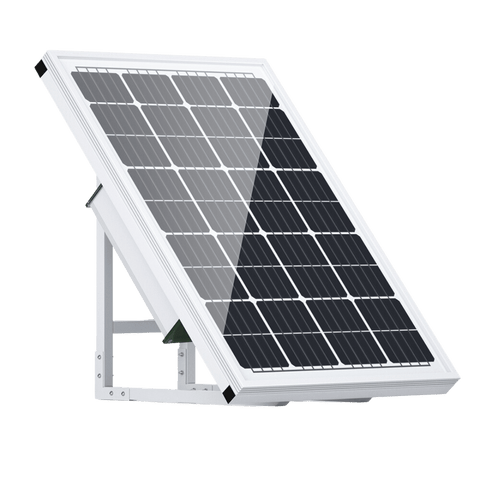
Solar Compatible, requires battery setup

General

Guided setup with help from our UK team

Free-to-Use App, multiple user access

18 Month Warranty, UK Based Support

Camera & Video

Wide Field of View, 90° for wider coverage

5MP HD Footage, view from your phone

Human and vehicle detection with phone alerts

Night & Visibility

Up to 30m Night Vision

20m Colour Night Vision (white LEDs)

Advanced Low-Light Performance

Connectivity

Multi-Network SIM included with the 4G model

4G model: suitable signal and paid data plan required

WiFi/PoE Option, for buildings & wired setups

Storage & Recording

Up to 256GB microSD Card

Continuous, Scheduled or Motion Recording

Easy Access, watch via mobile app

Build & Power

UK Weatherproof Rating, all year round

No Internal Battery, requires mains or 12V battery

Solar Panel Compatible, requires battery setup

General

Guided setup with help from our UK team

Free-to-Use App, multiple user access

18-month warranty plus ongoing UK support

Connected in the countryside

More choice of rural coverage.

For 4G models, RuralView Multi-SIM connects through EE, Vodafone, O2 and Three. Share a data allowance across cameras. An active paid plan and suitable signal are required.

View SIM plans

Here to help

Bullet Camera FAQs.

Connection, power, recordings and support, explained.

Frequently bought together.

12v Extension Cable
12v Extension Cable

12v Extension Cable

£5.00
Leisure Battery Connectors

Leisure Battery Connectors

£12.99
CCTV Sign
CCTV Sign

CCTV Sign

£4.99
Camera Pole Mount
Camera Pole Mount
Camera Pole Mount
Camera Pole Mount

Camera Pole Mount

£24.99
Camera Corner Mount
Camera Corner Mount
Camera Corner Mount

Camera Corner Mount

£19.99
Connection Box
Connection Box
Connection Box

Connection Box

£4.59
CAT6 External
CAT6 External
CAT6 External

CAT6 External

£11.99
PoE Switch
PoE Switch
PoE Switch

PoE Switch

£35.00
Zoom Hang Mount
Zoom Hang Mount
Zoom Hang Mount

Zoom Hang Mount

£12.99

A little help along the way

Useful guides.

Camera buying guide

Find the right camera for your location.

View buying guide

Compare cameras

See the features side by side.

Compare cameras

Camera installation guide

Plan your position, power and view.

View installation guide